Correct Pack - Professional Coding and Marking Machine Manufacturer
Language
Correct Pack - Professional Coding and Marking Machine Manufacturer
Marking large, fixed items can be a real challenge. It’s often because you have to use bulky equipment for the job. The type of laser marker you pick makes a huge difference. This is true if you are adding serial numbers out in the field or processing batches of parts for production. The portable, handheld laser marking machine has become very popular lately. Designers make these portable laser printers small, lightweight, and easy to store. They are also easy for users to navigate.
Modern portable laser marking devices are small but powerful. They mark with speed and operate with precision. Plus, switching modes is easy. A portable laser printer is great for home, office, or on-the-go projects. It provides convenience and quality without compromise. Many users want a dependable handheld laser marking machine that fits their workflow. You’re not alone in this search.
What is a Portable Laser Marking Machine?
The portable laser marking machine solves the problems of marking large components. It’s easy to carry and offers a flexible working range. You can use it anywhere, making it more convenient and practical.
The portable laser marking machine stands out from desktop models. It’s lightweight and easy to use, allowing for handheld marking. It's often called a handheld laser marking or coding machine. This is due to its compact design, which is easy for users and easy to operate.
Why Pick a Portable Laser Machine
● Precision: These markers offer clear and accurate markings, key to quality and compliance.
● Speed and Efficiency: Designed for rapid marking, they enhance productivity without sacrificing quality.
● User-friendly interfaces make operation simple, even for beginners.
● Durability: These manufacturers build these products to last. They must maintain minimal upkeep. This means they maintain steady performance and lower your expenses over time.
● Versatility: These can mark many materials, so they fit various marking needs.
● After-sales support: Quality machines come with strong after-sales service for maintenance and assistance.
● Impact on Business:Using a portable laser marker can boost your marking processes. It helps improve brand quality and makes operations more efficient. This benefit applies to businesses of all sizes.
Quick Comparison: Portable vs. Desktop Laser Marking Machine
When choosing between portable and desktop laser markers, several key factors help determine which fits your needs best.
| Feature | Portable Laser Marker | Desktop Laser Marker |
| Portability | Lightweight, mobile (<10kg) | Heavy, stationary (20–50kg) |
Max Marking Area | Up to 75mm | Up to 450×440mm (A3 size |
| Marking Speed | >7000mm/s | Up to 36,000mm/min (~600mm/s) |
| Material Range | Metals, plastics, ceramics | Metals, wood, acrylic, thick materials |
| Use Scenario | Small batches, fieldwork, studio | Industrial batch, prototyping |
| Cost | Lower upfront cost | Higher upfront cost |
| Maintenance | Operator skill-dependent | Stable and precise |
How to Choose a Suitable Portable Laser Marker?
When choosing a portable laser marker, look at its key features. This helps you get the best return on your investment. Key considerations include:
● Marking Quality: The laser output must be precise. It guarantees the marking result is clear and readable.
● Marking Consistency: We need a stable power supply from the battery for consistency. The laser should also provide a constant output to produce the same results every time.
● Marking Speed: It is generally possible to use a galvo laser marker to mark at high speed. The maximum speed is determined by the laser's power and the galvanic mirror's performance. Marking speeds up to 10,000 mm/s can be attained.
● Material Compatibility: Select which materials the marking machine can mark. Portable laser markers such as the Correct Pack F20i can mark metals, plastics, and most common materials. They can be used in the home, office, and for industrial purposes.
● Software and Connections: An easy-to-use interface and compatibility with common design software improves ease of use.
● Maintenance and Durability: Machines with low maintenance and durability offer greater reliability. As a rule, air-cooled machines are easier to maintain than water-cooled machines.
● Safety: Ensure the machine meets industry standards and has protective features. This machine may include a guard, fume extractor, matching goggles, and emergency stop button. Safety is key.
● After-sales Support: Good after-sales service and a strong warranty can add long-term value to a machine.
Best Portable Laser Printer: Correct Pack F20i Portable Fiber Laser Printer
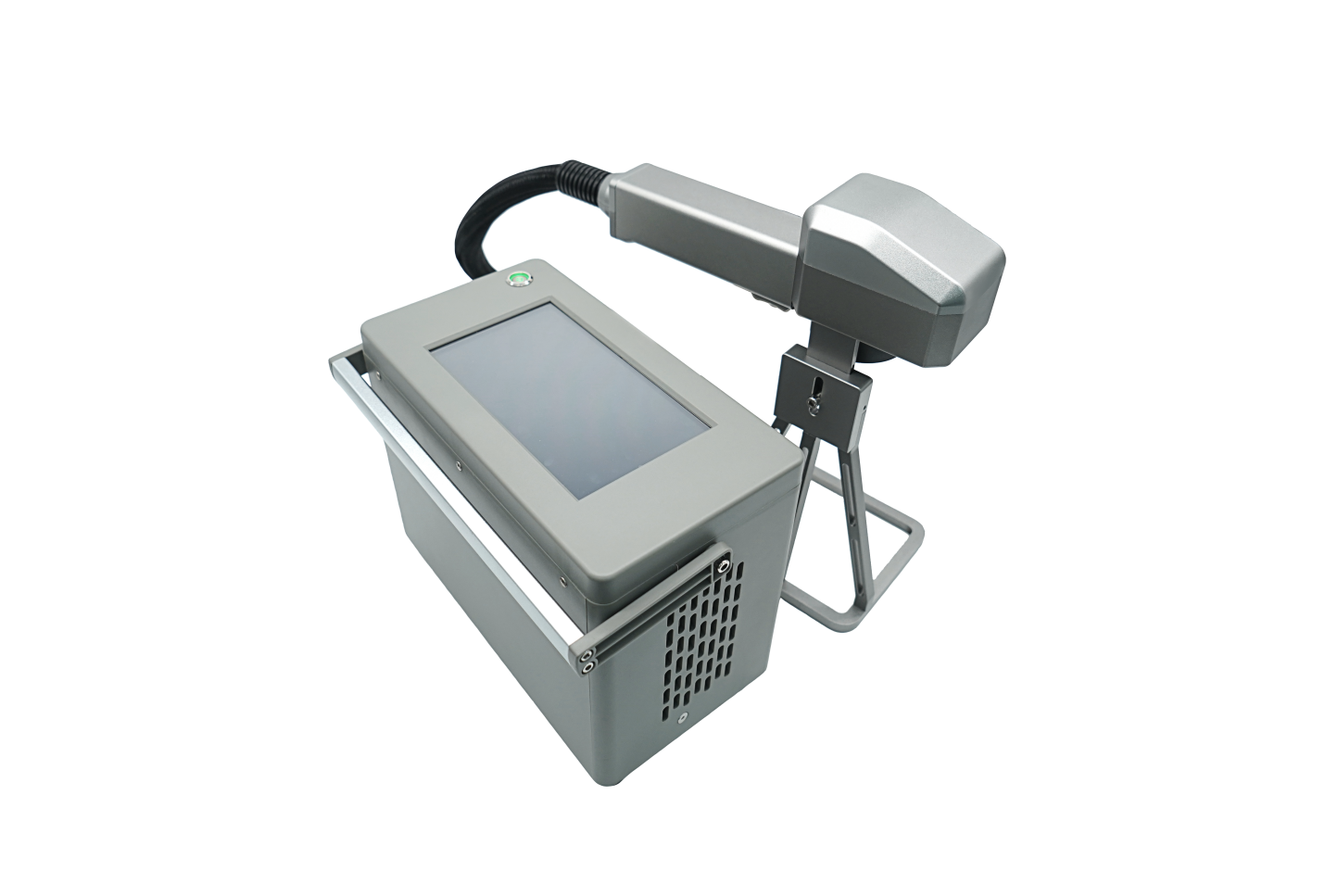
● Offers a 6 to 8 hrs Battery Backup for Wireless Use
● 1.25 kg Easy-to-handle lightweight head
● Works across metals, plastics, and more
● Auto start-stop for effortless operation
Applications: Field technicians, jewelers, or small business owners who need quick, precise engravings anywhere without a bulky workstation.
Tips to Make Your Portable Laser Printer Last Longer
Daily/Regular Maintenance
| Task | How to Do It | Frequency |
| Clean The Lens | Use 99% isopropyl alcohol + lint-free wipe. Never touch with fingers | very 20-50 hrs |
| Remove Debris | Blow out dust from the scan head with compressed air | Daily use |
| Check Cables | Inspect USB/power cables for fraying or damage | Weekly |
Operational Tips
● Avoid Overheating: Use in <35°C (95°F) environments. Let cool 10-15 min after 2-3 hours continuous use.
● Material Preparation: Clean the workpiece thoroughly. Ensure that there are no oily/dirty surfaces. These can damage the lens up to three times faster.
● Lower power when possible: Test marks at 50-70% power first instead of max.
● Battery Life: Stop and recharge at 20 to 30%. Never let the battery fully drain.
Long-Term Care
● Storage: Keep in original case at 10-30°C (50-86°F), <60% humidity.
● Software Updates: Check the manufacturer’s website quarterly for firmware updates. It fixes minor problems and glitches and improves efficiency.
● Service Time: Seek professional calibration from an industry expert after every 500 hours and replace the lens after every 2000 hours.
Conclusion
Choosing the right portable laser printer depends on your needs. These compact devices offer speed, efficiency, and cost savings. They are essential for today’s mobile workforce. You can find a printer for any workspace. They range from basic models to multifunction devices.
At Correct Pack, we know reliable printing solutions matter. The F20i portable handheld laser printer is a great option for professionals. It’s compact and durable, perfect for various marking tasks. Correct Pack's solutions help you work faster and more efficiently—whether you're in the office, at home, or on the go. We can help you find the best portable laser printer or solution. Share your printing needs. We’ll help you find options that improve your productivity and efficiency.
Science and technology oriented, continuous improvement, Correct Pack always committed to providing customers with valuable products and satisfy services

China Coding & Marking Machine Manufacturer
Correct Pack Technology Company
Address: Floor 3, Building 1, No. 728, Jinhu Road, Sanzao Town, Jinwan District, Zhuhai City

